

In the strategy game Civilization, new tech discovered leads to new game capabilities becoming available, such as units, buildings, land improvements and “wonders”. This (new) Tech Tree blog series borrows the idea to examine technologies that could make more ambitious agent projects possible. Each post starts with a simple question and then examines technologies that could answer the question.
Without further ado, how do you manage a process that takes days or weeks?
Of course, we can babysit the agent and watch for the their prompts every so often. But in 2026, surely we don’t need to babysit a process if it runs for hours, days or even weeks.
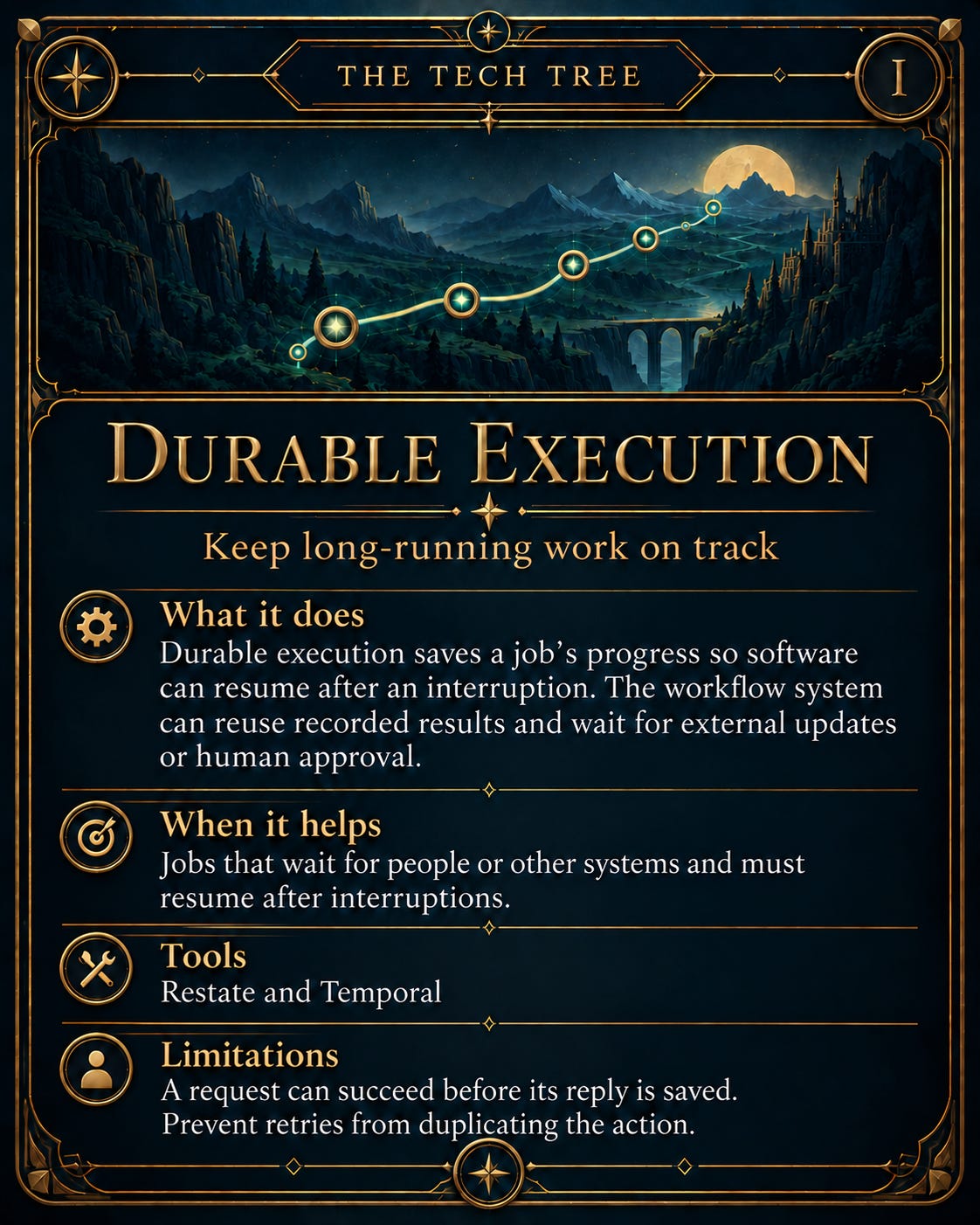
How might one go about solving this? A long-running process needs to track progress and have a way to resume after interruptions. “Durable execution” provides that capability. The process can wait for something else to complete or a human decision, then resume work with the progress that’s been tracked. It’s like saving in a game. If the console crashes mid-game, we don’t want to have to repeat the last boss. Restate and Temporal are platforms devs can use to build these processes (note, I’ll use the word “workflows” interchangeably with processes).
This post explains durable execution and the tools to make long-running processes possible. I’ll detail where it can help when several systems are involved. I’ll also describe why I tried Restate to coordinate coding agents and what I needed to do to handle recovery if a process crashed.
What Durable Execution Means
Durable execution lets a multi-step job continue after the program running it stops or crashes. The durable execution system (I’ll interchangeably say “workflow system”) tracks completed steps and results. It might wait for an external change/update or retry failed steps. We, as engineers, write the rules for how the system should respond to these events.
I like to think of the thing we track as an “entity”. For example, a dev ticket or an e-commerce order may be an entity. An entity keeps the same ID throughout a process. The entity’s state describes its current situation, such as a dev ticket that’s waiting for a human’s approval. The entity lifecycle describes the changes from creation to completion (e.g. order paid, order shipped, order received).
The workflow system defines the actions to take and when to wait for external input.
Both platforms manage pending tasks and save execution progress. Their cloud services operate the storage for you. If you host the platform yourself, Restate includes embedded storage, while Temporal requires a database such as PostgreSQL. Your application may still use a separate database for customer records and reporting.
Restate and Temporal
Restate and Temporal are durable execution platforms that let devs describe the steps of a job. Neither Restate nor Temporal provide the business process — that’s for us to define. We must supply the process and connect various services (CRM, Github, Slack, etc) that are needed to perform the work.
How Restate and Temporal Differ
Restate adds recovery and failure handling to jobs. With its Virtual Object model, each tracked item has its own saved state and has code to facilitate the state changes. Restate handles the item’s changes and helps avoid conflicting updates. I like to think of Restate following the Object Oriented Programming (OOP) paradigm somewhat, for those familiar with OOP.
Temporal organises the job around a Workflow however, which contains instructions for the overall process. It delegates work, such as requesting a payment, to code called Activities. Programs called workers run the Workflow and Activity, and report back to the Temporal platform.
Both Restate and Temporal can manage an entity’s lifecycle from creation to completion. Restate’s Virtual Object model groups the entity’s saved state with actions such as “save plan” and “get approval”. Temporal’s entity Workflow describes how the entity progresses, which is slightly different. Prepare a plan, wait for approval, then start coding. Restate can also do the same and supports Workflows for describing an entire process, as Temporal does. The distinction is how devs organise code, with both platforms supporting similar end results.
Saved state: Restate’s Virtual Object stores an entity’s data as persistent fields, alongside code that updates them (similar to encapsulation in OOP). A Temporal entity Workflow holds that data in workflow variables, which Temporal reconstructs from history after an interruption.
Recovery: Developers wrap external calls in Restate’s durable steps or put them in Temporal Activities. Both platforms save completed results for reuse after an interruption. If your application requests a payment and crashes before Restate or Temporal saves the response, the platform may send that payment request again.
How your code runs: With Restate, you deploy your code as a service that accepts requests. Restate calls that service to run the requested operation. With Temporal, you deploy worker programs. Temporal places tasks in its queues, and your workers collect and execute them.
For a development ticket, you could equip your Restate Virtual Object with code for saving a plan and recording approval. A Temporal entity Workflow could receive those decisions and start the coding implementation through an Activity. Before coding starts, your application must check that the agent is using the plan the person approved.
What Does It Cost?
Both platforms can run on your own servers, which you’d pay for and maintain. Their hosted services are priced, as of October 2026:
Restate Cloud has a free tier, with paid plans starting at US$75 a month.
Temporal Cloud has no base monthly fee. Usage starts at US$50 per million billable operations, plus storage and a dev-support charge of 10% of usage
Application hosting and AI-model costs are not included above.
Where Would You Use This?
Durable execution lets our software/application wait for real-world events, such as a delivery arriving or a person responding. The tracked, saved progress lets the application continue the entity lifecycle when the update arrives.
Example #1: A Monthly Subscription
Suppose you’re building a monthly subscription service. Each subscription has an ID, a status and a renewal date. The service must keep track of tasks and constantly be aware of what task is next.
A workflow can wait for the next renewal date or a cancellation request. After a successful renewal, it records the outcome and saves the next renewal date. The cycle repeats under the same subscription ID. Temporal’s recurring billing tutorial demonstrates this lifecycle structure through billing periods and cancellation.
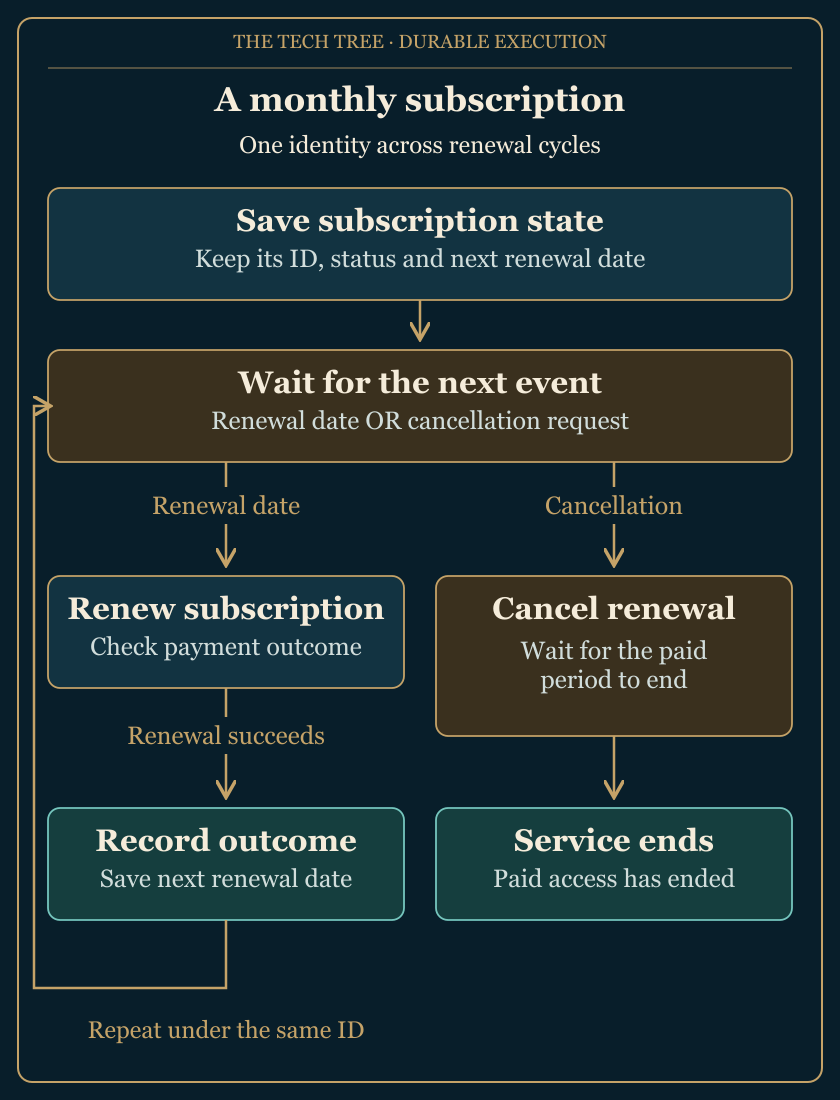
Restate Virtual Objects and Temporal entity Workflows can both manage this lifecycle. Existing billing software such as Stripe may already cover it. A durable execution platform becomes worth considering when the service has to coordinate custom work around the aforementioned subscription (lifecycle) events.
Example #2: A Home Blood-Test Kit
Suppose you have a blood test kit that you can use to sample blood at home and send to a a lab to get your results.
For this kind of product, the application (that came with your blood test) may connect with the shop, delivery service, lab, etc. A workflow could use the order number to track dispatch, wait for the returned sample and notify the customer when the lab reports that your results are ready. The lab performs the testing. The workflow coordinates updates across the different systems.
How Much Infrastructure Does the Job Need?
Adding a workflow platform means maintaining (yet) another service. It should however reduce the coordination code the application needs. A durable execution platform may be overkill for a quick task that only reads information. If it fails, you can just run it again without it costing much. For a longer job with a few stages, your existing database and task queue could be enough to save progress and resume the work. Depending on what you’re building, other technologies such as LangGraph or AWS Step Functions may be worth considering.
LangGraph connects an agent’s steps into a flowchart-esque structure. It can save progress between steps and resume after a pause for human input. It could manage the complete job. Restate or Temporal are candidates to evaluate for better coordination of work across separate programs.
AWS Step Functions can run a step-by-step process. Its Standard workflow can wait for another service to finish or for a person to approve a step. It fits processes well if you have existing AWS infrastructure to integrate with. If you’re connecting local coding workers however, you’ll need application code.
Why I Tried Restate for Orchestration
I have an orchestrator itch. I’ve been writing about it in The Factory Must Grow. I want to put loose requirements in a ticket system (like Linear) and get back a reviewed pull request (PR) with proposed code changes. I want to approve the implementation plan before coding starts and inspect code before release.
I’d already been burnt by Symphony and an earlier attempt at building an orchestrator from the ground up. With Symphony, I tried to use GitHub Issues for issue tracking and kept hitting GitHub rate limits. Building an orchestrator is hard. This time I wanted to keep ticket tracking separate in Linear. I also went looking for an off-the-shelf way to manage progress because I didn’t want to build another huge controller.
The coding job has a lifecycle: Plan > Approve Plan > Write Code > Open Draft PR > Test and Review > Human Review. Linear has my tickets, while the coordinator manages the work and approval decisions (approved by me). Restate’s Virtual Objects appealed for this ticket-based development.
My pilot for this coding orchestration system uses Restate to save each dev ticket’s progress. A local controller, which coordinates the job, manages sessions in the AI coding tool (in my case, Codex). It advances tickets to the next human approval and supervises the coding locally.
Tickets are labelled with “Input needed” when a human decision or recovery is needed. These tickets are brought to my attention while Restate focuses on routine progress.
Human approval is needed for the implementation plan before coding. Why require human input before executing a plan? As a great manager told me once, “changes are cheapest to make at planning time” and it’s no different here. If I request changes to a plan, it needs fresh approval after the plan is rewritten. A timed-out worker also needs double-checking before resuming, as the original process could still be changing files. The workflow platform handles a lot but we still need controller code for edge cases.
The benefit I’m hoping for with all this is less need to maintain custom tracking and recovery code. I learned the hard way from my early The Factory Must Grow blogposts that coding it all from scratch is hard.
Suppose the Coding Agent Stops Halfway Through
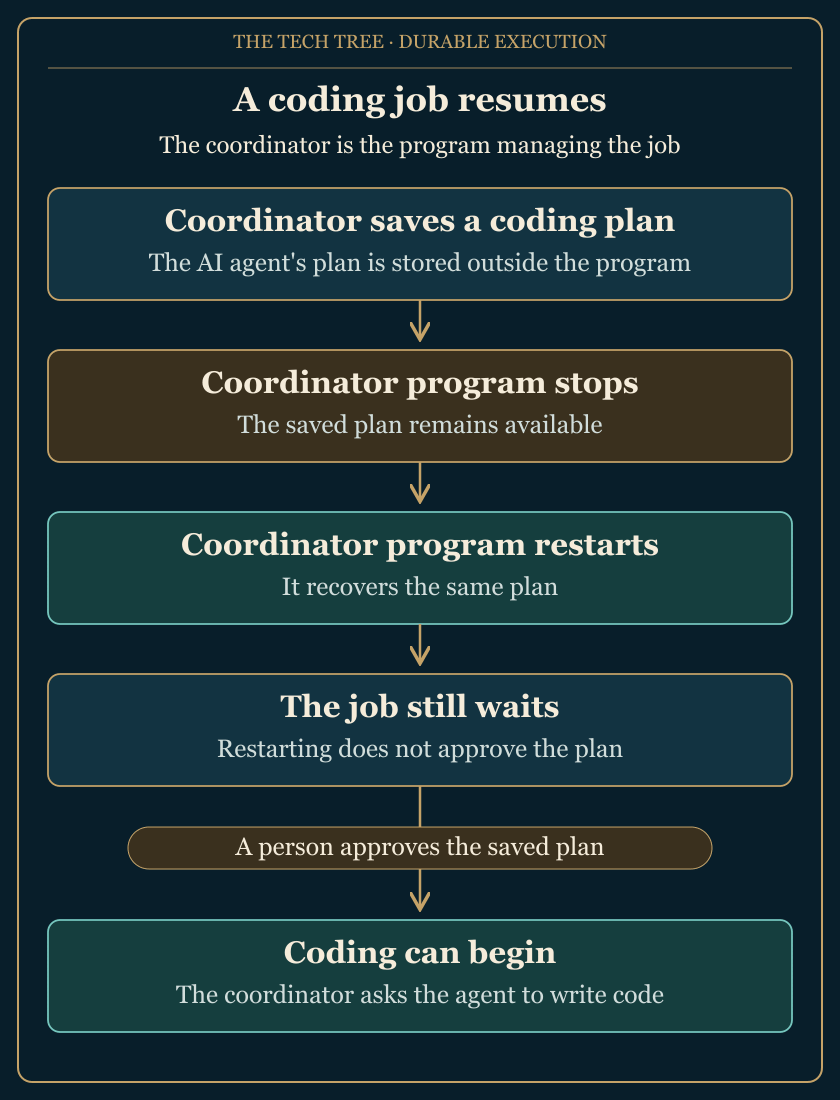
Suppose now that an AI coding agent researched the codebase, wrote an implementation plan for a a Linear ticket I made. The program coordinating the job then unexpectedly crashes before coding starts.
If the plan and research notes existed only in the running program’s memory, a restart would have lost all of it. At worst, the agent would have to do all the research again before writing a new plan. That wastes time and Codex tokens (and they’re expensive as we like to plan with better reasoning models). Saving the plan and its supporting notes is the smart move for recovery.
Restate can track the completed plan as a durable step. Once the result is saved, recovery can reuse that plan. One useful pattern we can use to recover from failure is “replay”. Restate, at the completed planning step, supplies the saved plan instead of asking the agent to generate it again (this is the “replay”). Temporal can do something similar with completed Activities.
Suppose now the agent has finished coding and asks GitHub to open a PR. GitHub creates the PR. But the worker crashes before the workflow can record the PR link.
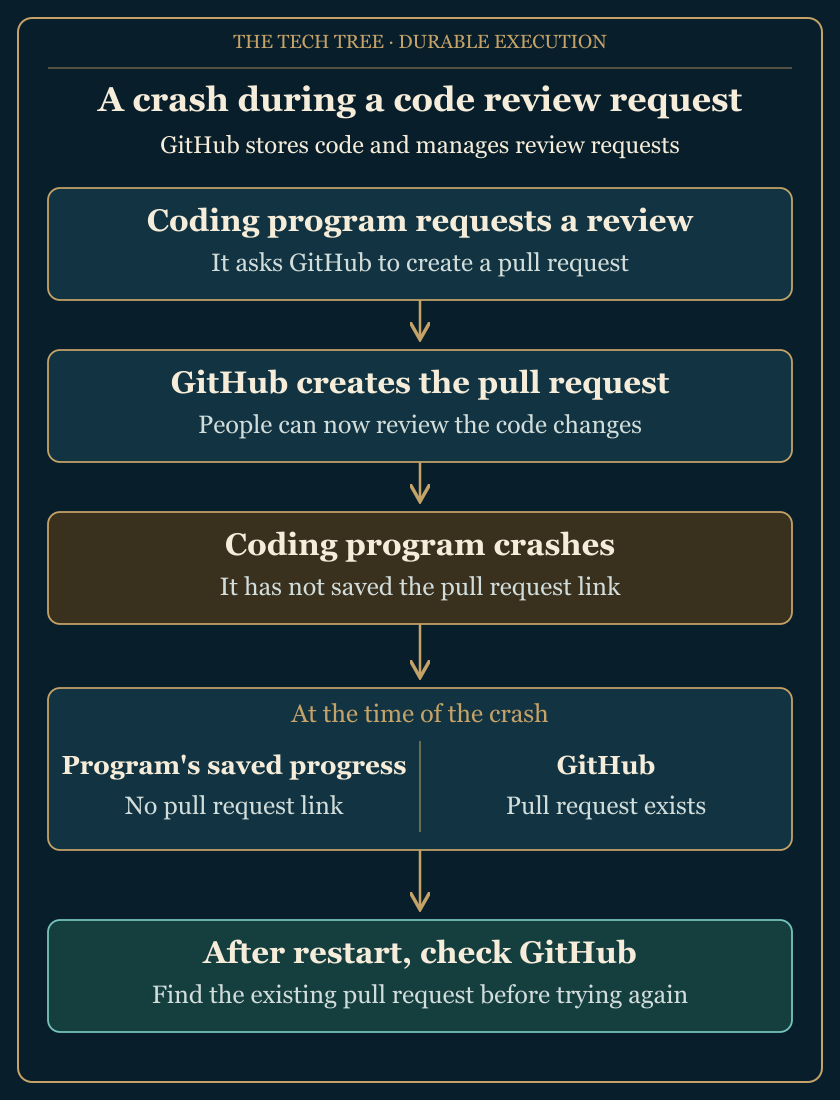
After the crash, GitHub has the pull request but Restate has no record of it. Retrying the request could fail because GitHub has already created the PR. So your application still needs to check whether the PR exists before trying again.
“Idempotency”, the expectation that retrying an action multiple times has the same result as doing it once, is still our responsibility. The application needs to handle the case where work already happened. To make PR creation safe for retries, the controller needs to check for and reuse the existing PR.
How Do You Manage a Process That Takes Days or Weeks?
Save progress for each job and define how it continues after an interruption. A database and queue may be enough for a few stages. But you might want to consider Restate or Temporal when maintaining waits and recovery has become a substantial (painful!) part of the application.
With durable execution, we can give long-running work a way to recover and wait for human approvals. It’s 2026 and we don’t need to babysit a process just to keep it moving!
If you’re experimenting with AI in your workflow, I’d love to hear from you! I write more like this at blog.mariohayashi.com, and feel free to follow me on X: @logicalicy.